


Hot App Reviews - Best Free Apps Download & Guides

Install Instagram at No-Cost

WhatsApp Setup

Download and Install YouTube

Save Videos or Photos From Instagram
 4.8
4.8
How to Save Content1. Download Videos(1) From Stories:- Tap your profile picture to view your story.- Click the three-dot symbol in the right corner of your video.- Click “Save” to download it directly to your device.(2) From Posts:- To save the posts you like without downloading them directly, you can tap the flag icon at the bottom right of the video post to save it in your Collections under Instagram.(3) Using Third-Party Apps:- For those that can’t be directly saved, consider using apps like “Video Downloader for Instagram” for Android or “Blaze: Browser & File Manager” for iPhone by copying the link of the video post. However, be respectful of privacy and copyright. Always ask for permission before downloading and using someone else’s content.2. Download Photos(1) Using Screenshots:- Take a screenshot of any image you want to save. But it may reduce the image quality.(2) Using Collections:- Like photos, on any photo post you like, tap the flag icon to save it in your Collections for easy access later.


ChatGPT vs. Other AI tools
4.8
1. Google GeminiFormerly named Bard, it is designed to work in perfect concert with Google services. Pulling information in real-time and offering unlimited questions at no additional cost, it nonetheless works only really well for those deeply embedded in the Google ecosystem. The contextual depth required for more in-depth, creative writing or deep discussions isn’t as accessible compared to ChatGPT.2. Microsoft CopilotIn fact, it integrates well with the Microsoft Office applications, providing document summarization, on-the-fly assistance within tools such as Word and Excel, among many other features. While Copilot will be very useful for users that spend most of their time in Microsoft products, in many ways it works at a more granular level and requires users to move in and out of various applications. ChatGPT, in contrast, is a better conversation tool in that regard, and doesn’t require quite as much application switching, thus making the workflow less jumpy.3. ClaudeDeveloped by Anthropic, focuses on safety and ethical AI use. It provides robust conversational capabilities and is designed to be helpful and harmless. However, while Claude excels in certain tasks like coding assistance and summarization, ChatGPT outperforms it in generating creative content and maintaining engaging dialogues. The extensive training data and advanced algorithms behind ChatGPT enable it to produce more varied and contextually rich responses.


Keep Your Account Secure
4.6
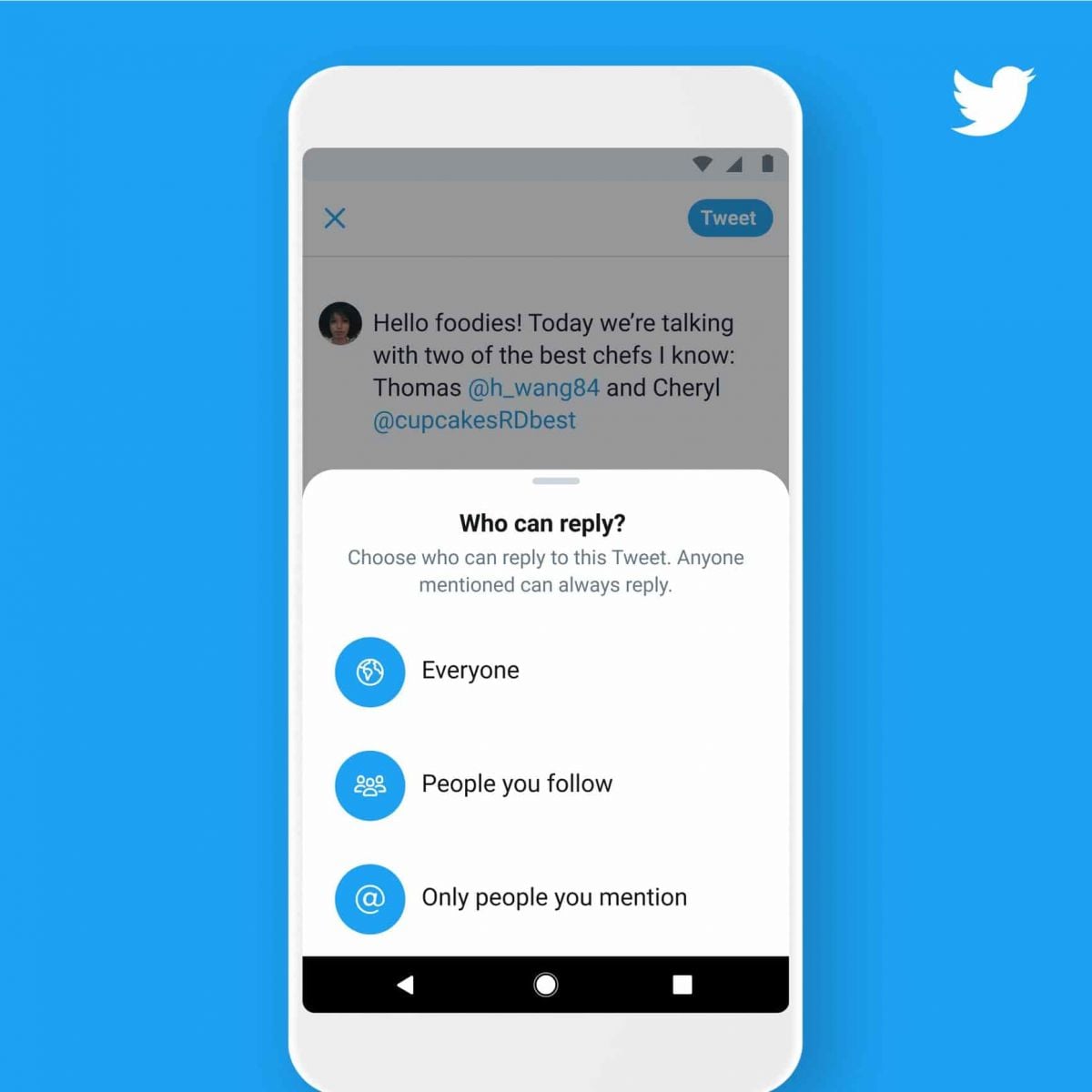
Measures to Prevent Compromise of Personal DataPrivacy Settings1. Set your account to private so that only confirmed followers can read your tweets.2. Control who can reply to your tweets by selecting options like “Everyone,” “People you follow,” or “Only people you mention.”Security Measures1. Enable 2FA for an extra layer of security during login.2. Use complex passwords like mix letters, numbers, and symbols and update them regularly.

TikTok Download
4.8
How to Obtain ItTikTok MobileOn Android:1. Open Google Play Store.2. Select the search bar and enter “TikTok”.3. Tap TikTok in the search results.4. Choose Install from the dropdown where it is presented and let the file download. The downloading page can also be found from here https://play.google.com/store/apps/details?id=com.zhiliaoapp.musically&hl=en_US.5. Once installed tap ‘Open’ to begin using the app.On iOS:1. Go to App Store on the iPad or iPhone.2. If you are on the “Search” tab, simply type in” TikTok” into the search field.3. Search for TikTok in the search results.4. Download the application by tapping ‘Get’. Or you can straightforwardly finish this step from here https://apps.apple.com/us/app/tiktok/id835599320. You will be asked to confirm via Face ID or Touch ID, or your password.5. After you’ve installed it, just tap ‘Open’ to arrive in TikTok.TikTok PC1. Open TikTok’s official website here https://www.tiktok.com/aboutusing any browser on your computer and scroll all the way to the bottom.2. Select the option right for your device like App Store download, Amazon Appstore download, Microsoft Store, etc.3. Go through the installation process of it.4. Tap TikTok icon from the home screen and register.

What You Can Do with WhatsApp
4.6
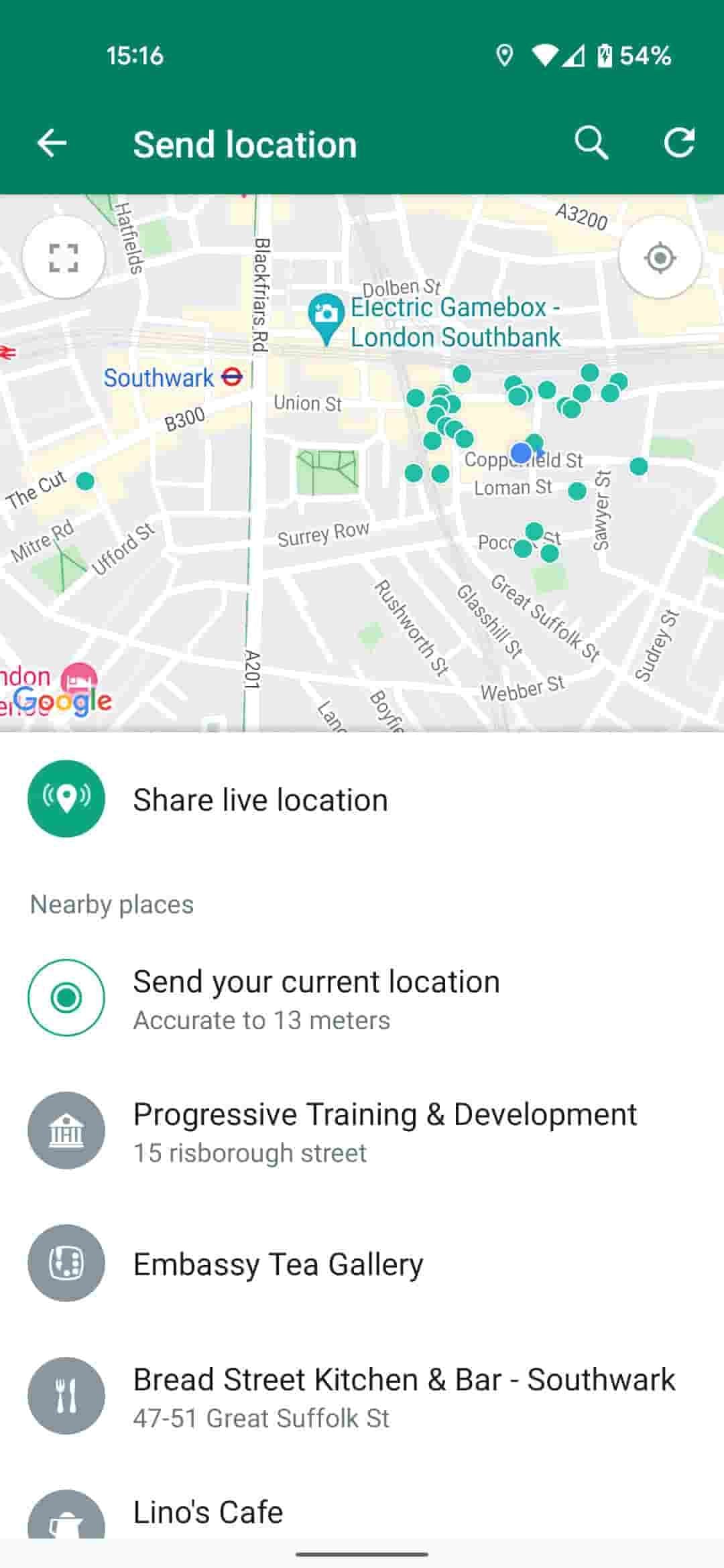
How to Use WhatsApp to Its Full Potential1. Users can send text messages, voice notes, make voice calls, and conduct video calls. It provides one-on-one chat and supports group chats of about 256 participants-a just-right number for team communication or family gathering.2. WhatsApp allows sending photos, videos, GIFs, and documents easily. Users can send high-quality media without the fear of compression or loss of quality. WhatsApp also supports sending live locations to help in coordinating meetups.3. The Status feature allows users to post photos and videos that vanish in 24 hours. It offers the possibility of sharing moments without their being saved-the feature is very tempting for users.

Download Facebook Lite at No-Cost
4.5
How to Install Facebook LiteMobile FacebookFor Android:1. Open the Google Play Store.2. Search for Facebook Lite.3. Tap Install to download it. Alternatively, visit and get from here https://play.google.com/store/apps/details?id=com.facebook.lite&hl=en_US.4. Launch the app and log in or create an account.For iOS:Facebook Lite is currently only available to Android users, not iOS devices.PC FacebookThere is no official desktop version of Facebook Lite; users access the mobile site by using a web browser.


Place Your First Order on Temu
4.4
How to Complete the Purchase1. Log into the Open Temu account with the details of your account.2. You can browse through items on home page or search for products that can be used.3. You’ll want to click on the product you want, specify options like color, size, and quantity and click “Add to Cart.”4. To review items that have been added to the cart, tap on the top right corner on cart icon. The whole thing is fine, so make sure of that.5. If you confirm the accuracy of your correct shipping address.6. You have to choose your mode of preferred payment (such as from credit or debit card, etc), and you also need to fill the details accordingly.7. Before you click ‘Place Order’ make sure to check everything (that would include items, shipping address and payment method).

Schedule and Join a Zoom Meeting
4.7
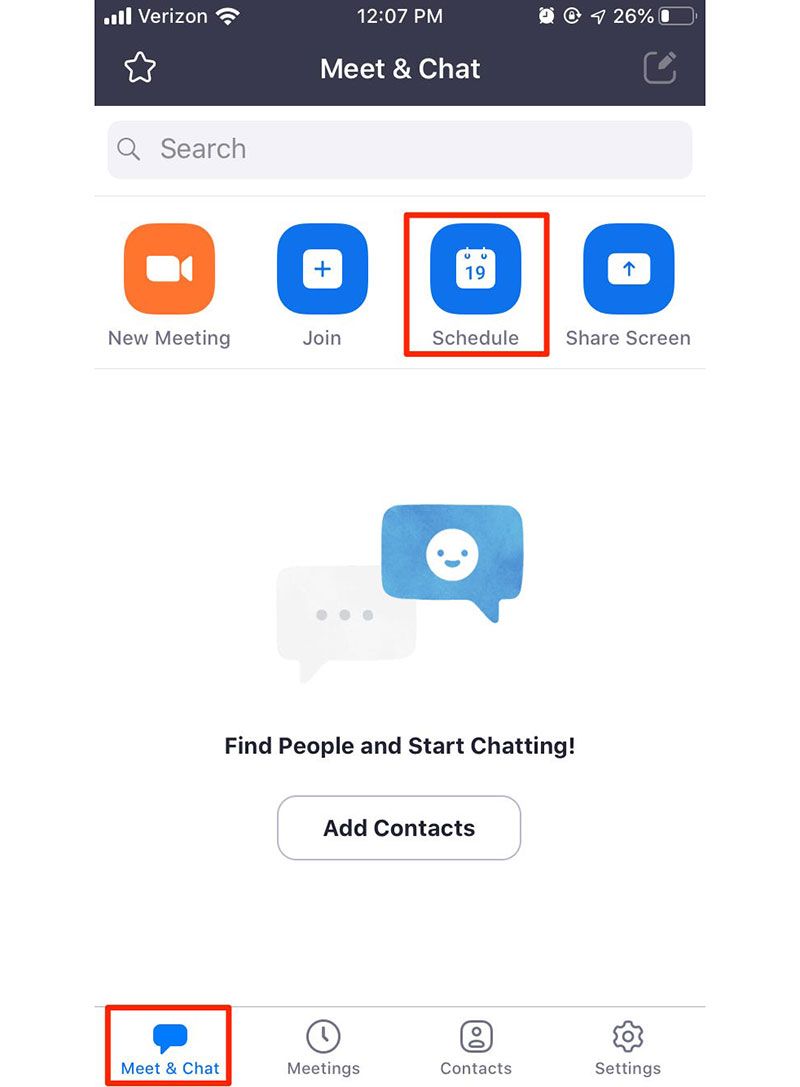
How to Arrange and Attend Zoom’s MeetingArrange a Meeting:1. Sign into your Zoom account via its app or its official website.2. Click on “Schedule” from the home screen.3. Choose the date, time, duration, and any additional settings like requiring a password or enabling waiting rooms.4. After saving your settings, share the generated meeting link with participants via email or messaging apps.Attend a Meeting:1. Launch Zoom or visit the website.2. Click on “Join a Meeting.”3. Input the meeting ID provided by the host along with your display name.4. If required, enter the meeting password before clicking “Join.”5. Adjust your audio and video settings as necessary.

Download Telegram Easily
4.0
Detail Installation Steps1. Android Devices:- Open the Google Play Store. In the search box, input “Telegram.”- Tap the one from Telegram FZ-LLC, then tap “Install.” More simply, you can just visit here to view the same page https://play.google.com/store/apps/details?id=org.telegram.messenger&hl=en_US.- Download and install the app. Open the app once downloaded and register your account using your phone number.2. Apple Devices iPhone/iPad:- On your Apple device, launch the App Store and search for “Telegram.”- Tap “Get,” then “Install” when prompted. Alternatively, get to the downloading page simply from here https://apps.apple.com/us/app/telegram-messenger/id686449807.- Install from the store and open it: in-app, register your phone number and start using Telegram.3. Desktop Version (Windows/Mac):- Go to the official Telegram website https://desktop.telegram.organd download the desktop application for your operating system.- Follow the installation prompts, then open Telegram.- Link it now with your mobile account, either by scanning the QR code or by typing your phone number.4. Web Version:- Alternatively, Telegram has a Web version for those who do not want to install anything. In a browser, just go to its official homepage https://web.telegram.org/k/, insert your phone number and access your account.

Make and Manage Payment in Play Store
4.8
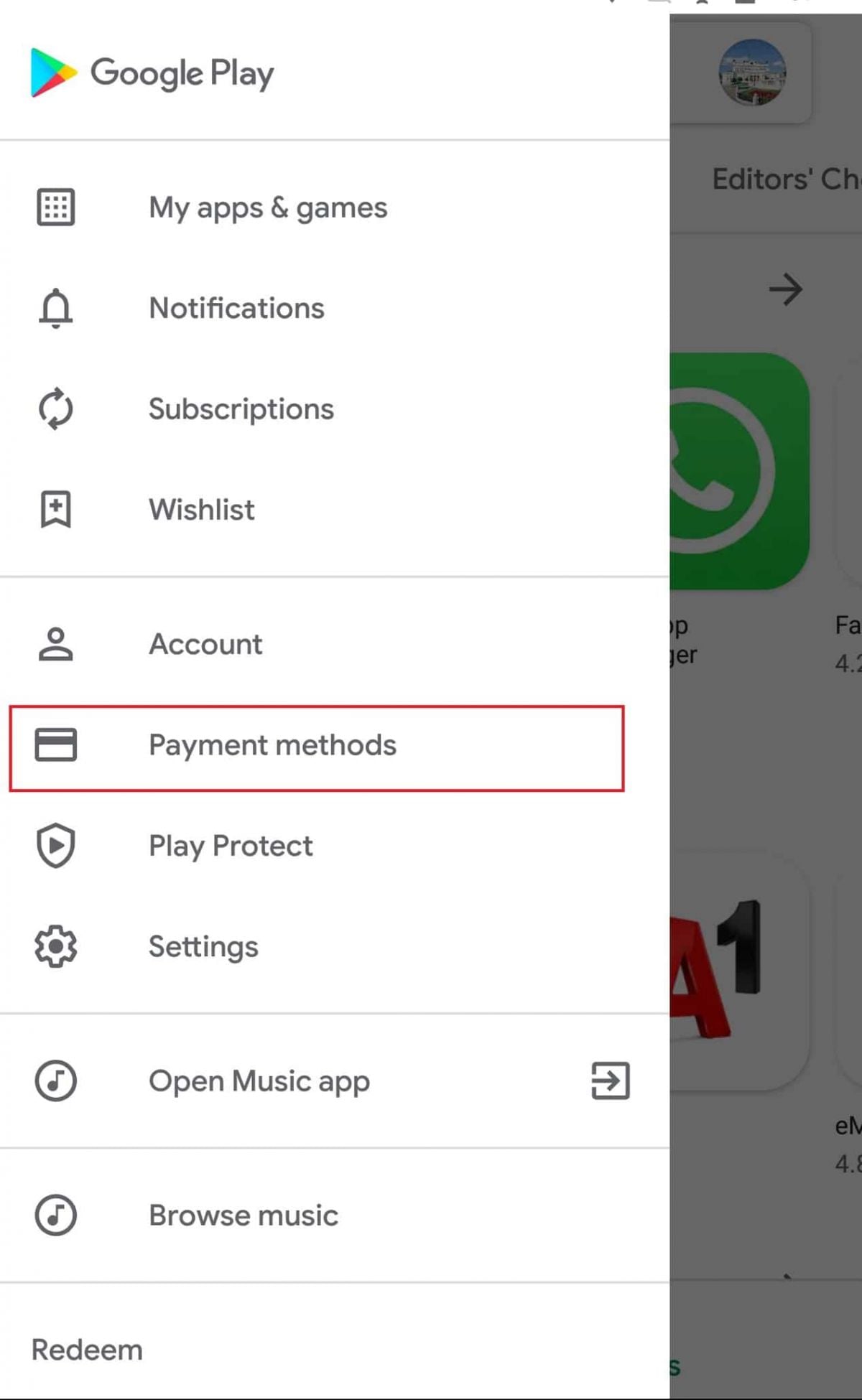
How to Make Purchases1. Open the application from the home screen of your device.2. You can search using the search bar or browse through categories.3. Tap the app or game you want to purchase.4. Tap the price button of corresponding app examples include “Buy” or “Install.”5. If prompted, select a payment method or add a new one.6. If prompted, follow any additional on-screen instructions to complete your purchase.Managing Payment Methods1. Open Play Store Settings by tapping your profile icon.2. Tap Payments & Subscriptions then select Payment Methods.3. Now you can add, remove, or update payment methods such as credit cards or PayPal to control how you pay.Removing Payment Methods in DetailTo remove a payment method from an account, follow these steps:1. Open the app.2. Tap your profile icon, located in the upper-right corner.3. Tap “Payments & Subscriptions,” then tap “Payment Methods.”4. Scroll down, and tap “More Payment Settings” that opens in a web browser5. Find the source of payment you wish to remove and tap “Remove.”
ARCHIVE
Category
- Communication
- Tools
- Shopping
- Lifestyle
- Entertainment
- Finance
- Art & design
- News & Magazines
- Productivity
- game
- Action
- Music & Audio
- Music & Audio
- Education
- Education
- Business
- Photography
- Books & Reference
- Business
- Health & Fitness
- Medical
- Educational
- Casual
- Video Players & Editors
- Maps & Navigation
- Adventure
- Sports
- Puzzle
- Arcade
- Personalization
- Art & Design
- Action
- Travel & Local
- Social
- Food & Drink