

Hot App Reviews - Best Free Apps Download & Guides

Install Instagram at No-Cost

WhatsApp Setup

Download and Install YouTube

Save Videos or Photos From Instagram
 4.8
4.8
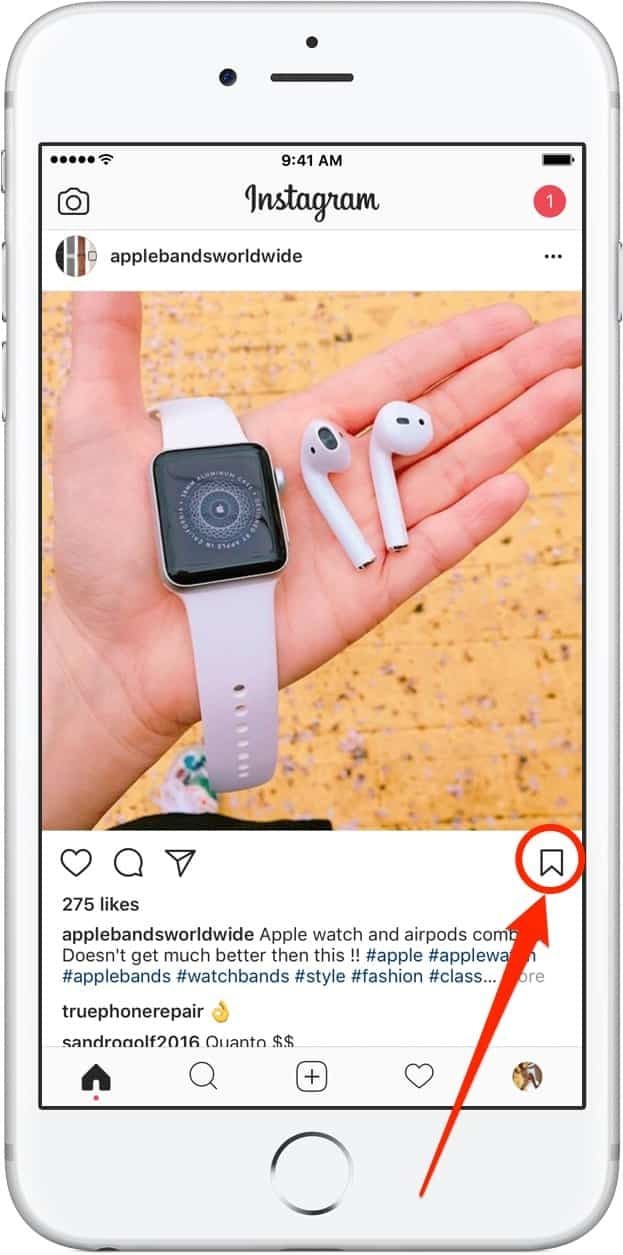
How to Save Content1. Download Videos(1) From Stories:- Tap your profile picture to view your story.- Click the three-dot symbol in the right corner of your video.- Click “Save” to download it directly to your device.(2) From Posts:- To save the posts you like without downloading them directly, you can tap the flag icon at the bottom right of the video post to save it in your Collections under Instagram.(3) Using Third-Party Apps:- For those that can’t be directly saved, consider using apps like “Video Downloader for Instagram” for Android or “Blaze: Browser & File Manager” for iPhone by copying the link of the video post. However, be respectful of privacy and copyright. Always ask for permission before downloading and using someone else’s content.2. Download Photos(1) Using Screenshots:- Take a screenshot of any image you want to save. But it may reduce the image quality.(2) Using Collections:- Like photos, on any photo post you like, tap the flag icon to save it in your Collections for easy access later.

Download Videos from Twitter
4.6
How to Save Videos You WantBuilt-in FeaturesThere’s currently no native way to download videos within Twitter’s website or app, however: You can bookmark tweets containing videos in it to watch online later.Third-Party Tools1. Websites such as SaveTweetVid or TwDown:- Copy the tweet link containing the video.- Paste it into the website’s input field.- Choose video quality and download.2. Use extensions such as Video DownloadHelper to get direct downloads from many sites, Twitter included.

Finding your Car and Get it Back Easily
4.0
It's seamless, when you park, the app will automatically record your car's precise location at a parking facility—down to the aisle and bay within which it is parked—using integrated sensors combined with UWB (Ultra Wide Band) technology with centimeter-level accuracy. When it's time to leave, just open the app and tap “Find My Car,”and it will instantly generate a live walking route that continues to update on your screen as you walk. No more guessing at floors or aisles — even in multi-story garages.More than just a position tool, by the way — it cross-correlates your car's location with parking-lot cameras, and functions offline in places where there is poor signal. Whether you're shopping, at a stadium or in an office park, MPLS Parking makes “where did I park?”into “here's where to go exactly.”

Live Plant Help Get Quick Plant Answers
4.4
All you have to do is open the app, snap a clear photo of a plant's flower, leaf or stem and press send to identify. Fueled by a database of millions of new plant images, it provides results in seconds — much faster than the average wait time of one minute for many competitors. Despite its capacity for the identification of more than 20,000 fundamental types of flowering plants and ferns, speed has never been traded off against accuracy, which can be up to 88.2%.Whether you're out for a hike and spy a strange wildflower or you are dealing with an unknown garden cultivar, PlantNet's fast reply keeps your trajectory on track. No lag, no effort — just instant plant names and details at your fingertips, whether you're online or off; the perfect weekend tool for lightening your cognitive load on the go.

Simplify Your Overseas Money Transfers with Remitly
4.9
The offering provides a number of ways that recipients can collect money, enhancing its flexibility and ease of use. Several users also mention that Remitly is affordable, thanks to its competitive exchange rates and wallet-friendly transfer services available for a number of countries.Although a few users have reported customer service responsiveness in specific cases and fees on smaller transactions, the general opinion stresses that of a reliable and efficient app for everyday use. For those who are coming from international backgrounds with families abroad, Remitly is a cut above the rest by making cross-border payments easier and more accessible.

Cleverest Way to Connect with Loved Ones Who Are in Jail
3.8
Second, from Apple Pay and Google Pay integration to our one-swipe funding of AdvanceConnect or Direct Bill accounts — there's no need to re-enter your card. Third, there are push-notification reminders to let you know every time an inmate makes a call so that you don't miss out on those special moments.Fourth, personal data and payment info are protected by end-to-end encryption and biometric log-in — certainly more so than with standard landline services.Finally, Securus Mobile's new low-bandwidth mode provides clear audio that works on 3G networks, an important feature for country towns where signals are weak. All backed by an intuitive interface allowing first-time users to plan a video visit in less than 60 seconds—demonstrating that staying connected can be both safe and easy.

Integration with Spotter Network
4.3
The main advantage of such an integration is the ability to crowdsource intelligence that matters. If a user reports hail, a funnel cloud or damaging winds on WeatherWise, that verified data is then immediately sent — not only to the app — but also to the National Weather Service and emergency managers. This is a healthy, two-way flow of information. For users, that's meant when they make observations, it feeds into public warnings immediately, and gives them a live map of confirmed, on-the-ground reports from other reliable storm spotters in the areas around them.This feature is ideal for weather junkies, storm chasers or people who simply like to know what the weather is doing. It enables people to be part of the solution when it comes to keeping their communities safe, by offering a faster and more informative view of local threats. The Spotter Network integration fills in that chasm between official predictions and the street level, effectively turning WeatherWise from a passive information service into an active life-saving network.

Unleash Your Green Thumb with Blossom
4.3
One of Blossom's outstanding features is its Precision. Using advanced image recognition algorithms, it is so accurate that it can pick out plants down to species level, telling varieties apart as well. Whether you're in a dense forest or at home in your own back yard for example a quick snapshot will yield all sorts of detailed information about the plant's name, origin, care instructions and the like.In addition, Blossom doesn't stop at marking. It provides personal care tips for users, from watering schedules to optimum sunlight--to help them bring their plants up well.The app nourishes a spirit of togetherness by allowing users to exchange their discoveries and ask for advice from fellow plant lovers.In this way, Blossom is not merely a tool but also travel partner on your journey into plants. It makes plant care same to the perception with a touch of reality for everyone.Blossom is changing the way we connect with plants. Its intuitive design and powerful AI skills make it indispensable for anyone interested in the flora around them. With Blossom, learning and caring for plants has never been easieror more fun.

Discover Nature's Secrets with Plantum's Precision Plant ID
4
For botanists and fans of nature alike, it's easy to take a picture and have the relevant data on the potted plant that you like dumped right in your lap. Things like its botanical name and habitat, considerations for how to care after it and Potential area of application are all described by Plantum. These details together make an integrated picture to further enrich your appreciation and understanding of the broader world we live in.What elevates Plantum above the competition is its continuous pursuit of learning and improvement, a promise that its identification capability will keep pace with the leading edge in technological innovation. Never before has it been so precise and satisfying to explore and identify plants with Plantum.High-precision identification with Plantum. A For such advanced software, which uses artificial intelligence to identify plants, even a smart phone becomes a powerful botanical tool.Now you can capture images of plants and discover detailed information--including classification by species, habitat information, and notes on ecological significance, with unmatched precision. It is a particularly valuable resource for both home gardening and teaching, and an invaluable tool for those who love nature but do not have that love extended vegetablegrower.The precision of Plantum is unmatched in sophistication and ease of use alike, it must be counted as a uniquely accurate and informative guide for the future exploration of the manifold varieties and complexities that comprise plant life. Let's move ahead together, then, into this new world with Plantum.

A Treasure Trove of 2,000 Nostalgic Songs
4.3
It is noadditionalchargeto readwhat’s elsewherebehind paywalls.The design also emphasizes friendliness to users. Clear search function, intuitive listing of most-popular songs, for all, to easily locate favorites. Whatever songs they consider particularly valuable can be added by users themselves. And the library is constantly being added to with new songs, thereby always remaining lively.So you can relive old memories as well as listen to all the best Japan has offered over many years and through many forms of art. I must recommend it. Use this app for a completely satisfactory experience.