

Hot App Reviews - Best Free Apps Download & Guides

Install Instagram at No-Cost

WhatsApp Setup

Download and Install YouTube

Keep your Instagram Private
 4.8
4.8
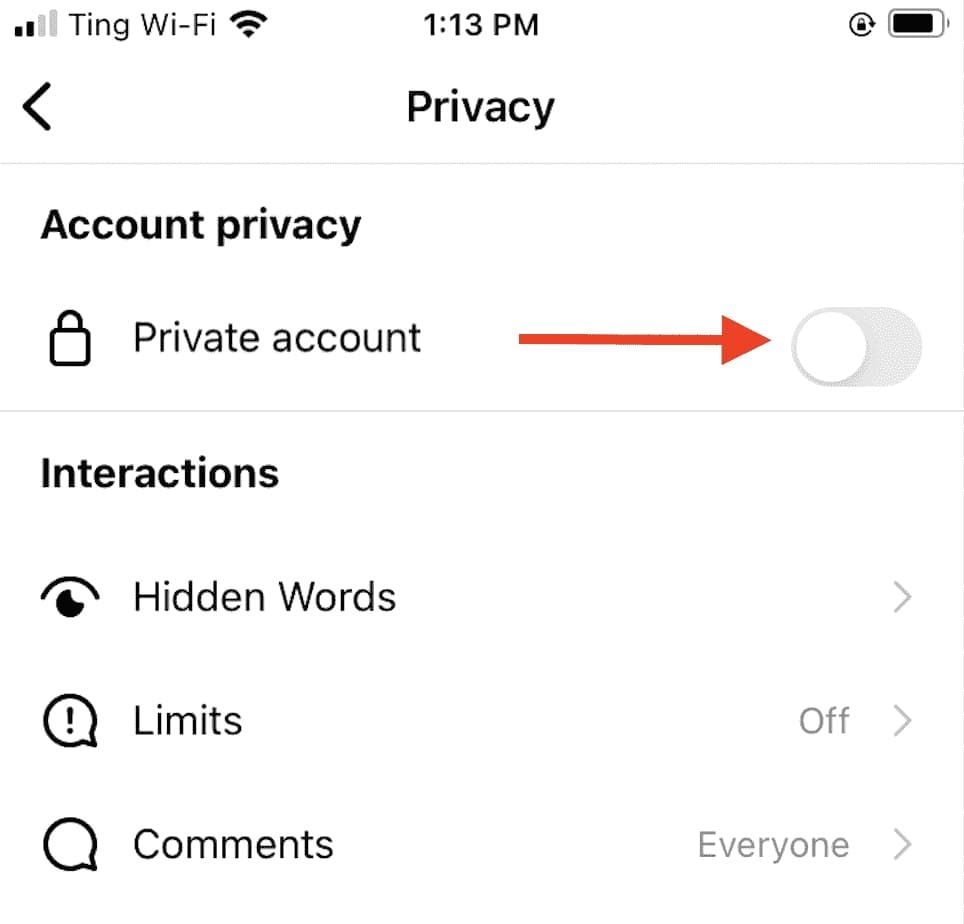
Privacy Settings1. Set your Account to Private:- Go to Settings > Privacy > Account Privacy and turn on “Private Account.” This will make your posts and stories visible only to approved followers.2. Manage Comments and Messages:- Control who can comment on your posts by going into Settings > Privacy > Comments where you can restrict comments from specific users or everyone except those you follow.3. Manage Location Sharing:- Be cautious when sharing location data while posting pictures or stories; disable location services in your device settings if necessary.4. Review Tagged Photos:- Check tagged photos by going into Settings > Privacy > Tags where you can choose whether tagged posts appear on your profile automatically or require approval first.5. Restrict Profile Visibility:- Regularly check followers; delete any that seem suspect or unauthorized to view your profile information.

Effectively Communicate with ChatGPT
4.8
1. Be Clear with Your Questions:When you ask specific questions, it is much easier for ChatGPT to understand what you need. You could skip asking for a general narrative of history like “Tell me about the history”, and instead may ask, “What are the main causes of World War I?”2. Provide Context:If what you are talking about is highly specialized, you may want to provide more background. Technical questions should also mention the tool or programming languages you are using.3. Ask Successively:If you feel overwhelmed by the information you may get, decompose your questions into smaller components and ask successively. You can first introduce a general concept and then go on with the details.4. Give Feedback and Adjust:If ChatGPT’s response is not what you expect, give feedback and ask for further clarification or adjustment of its answer.


Download Videos from Twitter
4.6
How to Save Videos You WantBuilt-in FeaturesThere’s currently no native way to download videos within Twitter’s website or app, however: You can bookmark tweets containing videos in it to watch online later.Third-Party Tools1. Websites such as SaveTweetVid or TwDown:- Copy the tweet link containing the video.- Paste it into the website’s input field.- Choose video quality and download.2. Use extensions such as Video DownloadHelper to get direct downloads from many sites, Twitter included.

Add Trending Songs to Your TikTok Videos
4.8
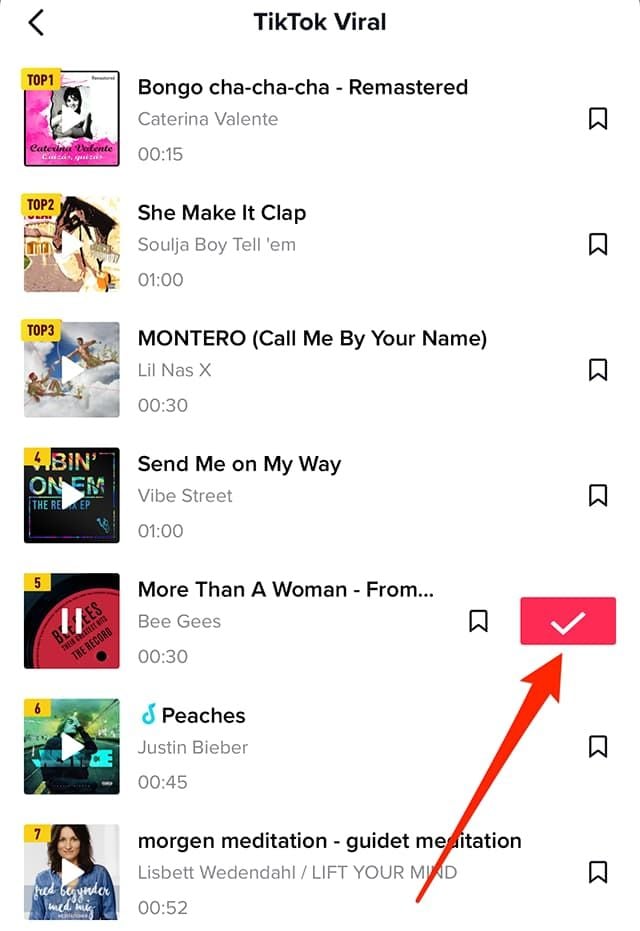
How to Add Songs1. First, create or upload your video by tapping the “+” icon.2. Tap “Sounds” at the top of the screen before recording or after uploading a video clip.3. Browse popular sounds or search by using the search bar to find any particular songs.4. Preview a song by tapping it, and if you like it tap ‘Checkmark’ to add it to your video.5. Before finalizing your post, you can drag your song on the timeline to where you wish it to become play in your video.

Uninstall WhatsApp
4.6
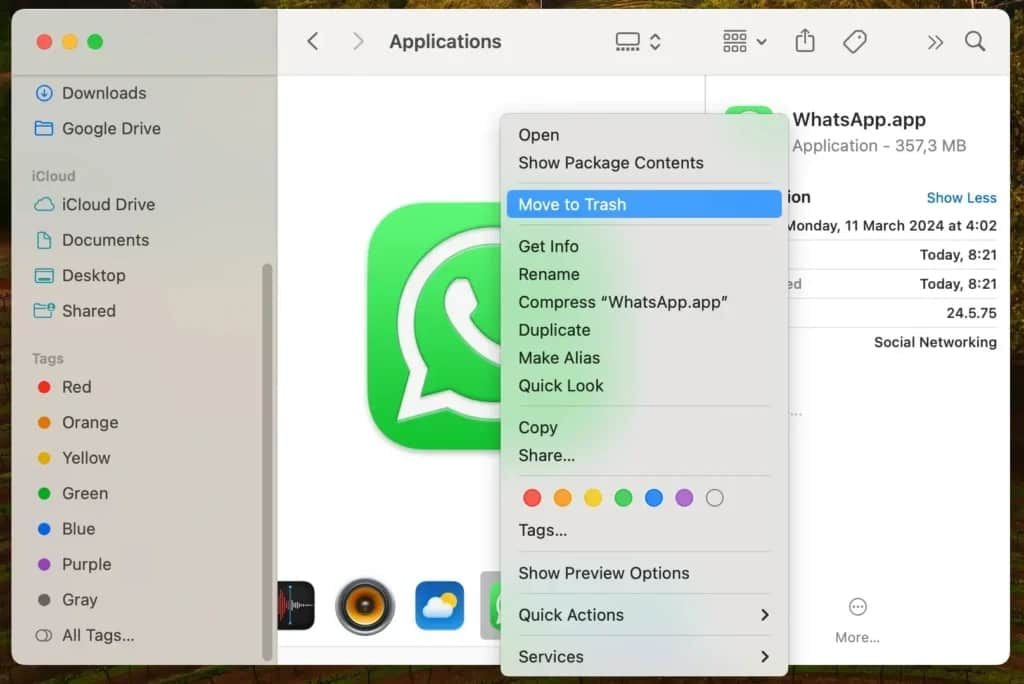
How to Uninstall WhatsApp1. Android Devices:- Long-press on the icon of WhatsApp and click on “Uninstall.”- Or go to “Settings,” select “Apps,” find WhatsApp, and click "Uninstall."2. iOS Devices:- Long-press on the icon for WhatsApp and select “Remove App.”- Alternatively, go to “Settings,” select “General,” then "iPhone Storage," locate WhatsApp, and delete it.3. Computer Systems (Windows/Mac):- In Windows, right-click at the Start Menu on WhatsApp’s icon and select “Uninstall.”- If you are on Mac, drag WhatsApp to Trash to delete it.

Install Facebook with Slightest Effort
4.5
How to Get Facebook on Various DevicesMobile FacebookFor Android:1. Open the Google Play Store.2. Search for Facebook in the search bar.3. Tap Install to download the app. Or directly from here https://play.google.com/store/apps/details?id=com.facebook.katana&hl=en_USaccess to the install page.4. Once installed, open the app and log in or create an account.For iOS:1. Open the App Store.2. Tap on Search and enter Facebook.3. Tap Get to download the app. More directly, visit your desired download page from here https://apps.apple.com/us/app/facebook/id284882215.4. After installation, open it to log in or sign up.PC FacebookFor Windows:1. Open the Microsoft Store.2. Search for Facebook in the store or go to the corresponding page here https://apps.microsoft.com/detail/9wzdncrfj2wl?hl=en-US&gl=US.3. Click Get to download the application.4. Once downloaded, launch it from your Start menu.For Mac:Unfortunately, there is no dedicated Facebook app for macOS; users can access Facebook via a web browser.


Sophisticated Weather Predicting Instruments
4.3
It has professional-level radar analysis with its WeatherWise Pro subscription as a standout. This includes advanced features such as Triple/Quad View Radar visuals that displays multiple radar products on the iPhone and iPad screens at the same time.Feature expanded data accuracy with both hydro-methods so you receive dual reflectivity and at maximum measurement areas of intensity and high rainfall. Users are also able to examine the history, playing back over 200 radar scans or 100 satellite frames in order to perform deeper research.For full-screen viewing. The WeatherWise Plus section also includes 3D Radar and 3D Globe Projections which provide a way to interactively explore weather systems through the ability to pitch weather maps and view storm structures. The Side-by-Side Radar Visuals keep two data layers side by side, while Smoothed Radar Tech allows an even clearer storm picture. The app also provides live feeds from storm chasers and a Spotter Network showing the current locations for spotters, helping to lead travelers through ground-truth-verified predictions.With radar for countries across the including USAand Netherlands, WeatherWise.app is able to combine these state-of-the-art tools with an easy-to-use interface. Free core features like live lightning tracking and live alerts are what make a difference during critical moments of weather warnings.

Never Forget Plant Care Again with Blossom's Reminder Feature
4.3
You can set up reminders for many aspects of plant care, such as watering, fertilizing and cutting. The application will send you timely reminders on your cell phone so that you never miss an important item of plant management again. To beginners or old hand always the failure element in plant care, this function can be of great help. It combines AI identification with actual plant management to provide easy-to -swim follow ups for your plants. With Blossom, taking care of plant health is plain sailing that lets soul you enjoy the charm of your green life without a care.

Discover Nature's Secrets with Plantum's Precision Plant ID
4
For botanists and fans of nature alike, it's easy to take a picture and have the relevant data on the potted plant that you like dumped right in your lap. Things like its botanical name and habitat, considerations for how to care after it and Potential area of application are all described by Plantum. These details together make an integrated picture to further enrich your appreciation and understanding of the broader world we live in.What elevates Plantum above the competition is its continuous pursuit of learning and improvement, a promise that its identification capability will keep pace with the leading edge in technological innovation. Never before has it been so precise and satisfying to explore and identify plants with Plantum.High-precision identification with Plantum. A For such advanced software, which uses artificial intelligence to identify plants, even a smart phone becomes a powerful botanical tool.Now you can capture images of plants and discover detailed information--including classification by species, habitat information, and notes on ecological significance, with unmatched precision. It is a particularly valuable resource for both home gardening and teaching, and an invaluable tool for those who love nature but do not have that love extended vegetablegrower.The precision of Plantum is unmatched in sophistication and ease of use alike, it must be counted as a uniquely accurate and informative guide for the future exploration of the manifold varieties and complexities that comprise plant life. Let's move ahead together, then, into this new world with Plantum.

Relive the Showa Era with This Free Music Archive
4.3
The app is able todownload up to 500 songs, one more interesting aspect is that you will have at least two chances (a 30-second musical string and full score for playback) of memorizing what something sounds like. Volumes and audio quality are another consideration.The platform provides a built-in search function and will give users recommended pieces based on their interests. With its simple interface design, people of all ages can easily find their way around this huge library of songs and movies.Showai is a cultural time capsule that captures Japan’s entire musical legacy and lets you enjoy it completely for nothing.